10 Point CGPA Calculator for Indian University Grades
CGPA Calculator
Target CGPA
SGPA → CGPA
How to Use This 10 Point CGPA Calculator
Calculate CGPA from courses
Under Semester 1, enter each course's credits and choose its grade. Select Add Semester for more terms. The Overall CGPA card updates as you type, and every semester shows its own SGPA.
Convert SGPA to CGPA
If you only have SGPAs from your grade cards, use the SGPA → CGPA table. Enter each semester's SGPA and its total credits.
Plan a target CGPA
The Target CGPA card picks up your current CGPA and completed credits from the course table. Enter the CGPA you want and the credits you still have left to see the average GPA you need. Download Report saves your semesters and target plan as an HTML file.
How your entries are handled
A course with credits but no grade is left out until you pick a grade. A course name entered twice is counted once, with the higher grade. Everything runs in your browser, and nothing you enter is sent to our servers.
10 Point Grade Scale Used in This Calculator
The grade dropdown follows the common UGC style letter grades, and each grade carries a fixed number of grade points.
| Grade | Points | Grade | Points |
|---|---|---|---|
| O | 10 | B | 6 |
| A+ | 9 | C | 5 |
| A | 8 | P | 4 |
| B+ | 7 | F | 0 |
Once you add courses, the calculator labels your CGPA with the bands below. These are the calculator's own labels, not an official class or division.
| CGPA | Label |
|---|---|
| 9.00 to 10.00 | Outstanding |
| 8.00 to 8.99 | Excellent |
| 7.00 to 7.99 | Very Good |
| 6.00 to 6.99 | Good |
| 5.00 to 5.99 | Average |
| 4.00 to 4.99 | Pass |
| Below 4.00 | Fail |
Which Institutes Can Use This Calculator?
Any course-based program that reports results out of 10 with credits works here, including B.Tech, BE, BSc, BCA, MCA, M.Tech, MBA and MSc at IITs, NITs, IIITs, VTU, Anna University, VIT, SRM, Manipal, KIIT, LPU, Amity and similar institutes.
Letter grades are not standardised across India, so match by grade points, not by letter. IISc's 10 point scale gives A+ ten points, and NIT Delhi's published grading rules also list A+ as 10, while A+ in this calculator is 9. For such a grade, choose O (10.00) from the dropdown.
If your grade points are not in the dropdown, or you already have SGPAs, use the SGPA → CGPA table with the SGPA printed on your grade card. The CGPA on your official grade card always takes priority over an online result.
How to Calculate CGPA on a 10 Point Scale
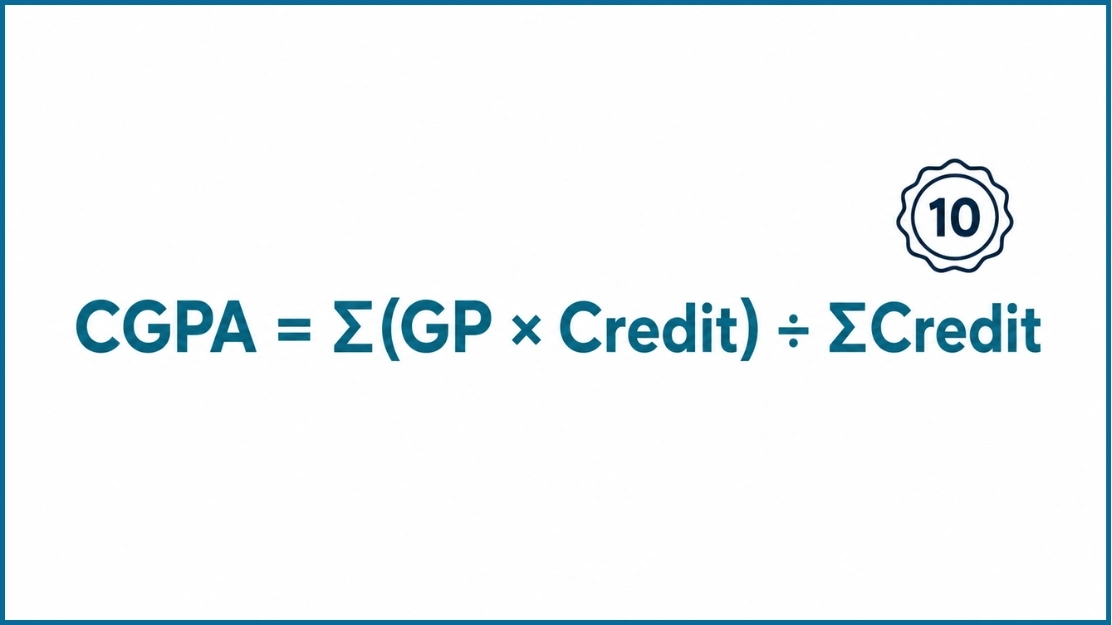
Multiply each course's grade points by its credits, add up these credit points, then divide by the total credits.
If every course has the same credits, CGPA is the plain average of grade points. For example, grade points 9, 8, 10, 7 and 8 give (9 + 8 + 10 + 7 + 8) ÷ 5 = 8.4.
Example with different credits
| Course | Credits | Grade | Grade points | Credit points |
|---|---|---|---|---|
| Mathematics | 4 | A+ | 9 | 36 |
| Physics | 3 | A | 8 | 24 |
| Programming | 4 | O | 10 | 40 |
| English | 2 | A | 8 | 16 |
| Electronics | 3 | B+ | 7 | 21 |
| Total | 16 | 137 |
CGPA = 137 ÷ 16 = 8.56. Mathematics and Programming move the result more than English because they carry more credits. SGPA is calculated the same way, using only the courses of one semester.
How to Convert SGPA to CGPA
Weight each semester's SGPA by that semester's credits: CGPA = Σ(SGPA × semester credits) ÷ Σ semester credits.
| Semester | SGPA | Credits | SGPA × credits |
|---|---|---|---|
| Semester 1 | 7.5 | 18 | 135 |
| Semester 2 | 9.0 | 26 | 234 |
| Total | 44 | 369 |
CGPA = 369 ÷ 44 = 8.39. A plain average of the two SGPAs would give 8.25, so credits matter when semesters carry different credit loads.
In the SGPA → CGPA table, enter credits for every row to get this weighted result. If every credit box is empty, the calculator takes a simple average of the SGPAs, which is correct only when all semesters have equal credits. If some rows have credits and others do not, the rows without credits are left out and a warning appears.
How to Find the GPA You Need for a Target CGPA
Required GPA = (Target CGPA × (completed credits + remaining credits) − Current CGPA × completed credits) ÷ remaining credits.
With a current CGPA of 7.8 over 80 completed credits, a target of 8.2 and 40 credits left, the required GPA is (8.2 × 120 − 7.8 × 80) ÷ 40 = (984 − 624) ÷ 40 = 9.00.
This is the average GPA needed across all remaining credits, not in each course. The calculator shows Not Possible when the answer is above 10, and Already Achieved! when the target is secured whatever you score in the remaining credits.
10 Point CGPA to Percentage
This calculator gives CGPA only. Percentage rules differ by university, so use the formula your university publishes. Three formulas are common:
| CGPA | × 9.5 (CBSE) | (CGPA − 0.75) × 10 (AICTE) | × 10 |
|---|---|---|---|
| 6.0 | 57% | 52.5% | 60% |
| 7.0 | 66.5% | 62.5% | 70% |
| 8.0 | 76% | 72.5% | 80% |
| 9.0 | 85.5% | 82.5% | 90% |
| 10.0 | 95% | 92.5% | 100% |
For other CGPA values or the reverse direction, use the CGPA to percentage converter.
SGPA vs CGPA vs GPA
| Term | Full form | Covers | Typical use |
|---|---|---|---|
| SGPA | Semester Grade Point Average | One semester | Tracking each semester |
| CGPA | Cumulative Grade Point Average | All completed semesters | Placements, higher studies, scholarships and your final record |
| GPA | Grade Point Average | One term at some institutes, the overall average at others | Common name on 4.0 scales |
To compare a 10 point result with a 4.0 scale, use the CGPA to GPA converter.
10 Point CGPA Calculator FAQ
A 10 point CGPA is a cumulative grade point average on a scale of 0 to 10. Each course earns grade points out of 10, and your CGPA is the credit-weighted average across all completed semesters. SGPA covers one semester, while CGPA covers all of them.
Multiply each course's grade points by its credits, add the results, and divide by the total credits. For example, 137 credit points over 16 credits gives a CGPA of 8.56. In the calculator, add your courses under Semester 1 and the Overall CGPA updates as you type.
Multiply each semester's SGPA by that semester's credits, add the results, and divide by the total credits. Enter an SGPA and its credits for each semester in the SGPA to CGPA table. If you leave every credit box empty, the calculator takes a simple average, which is correct only when all semesters have equal credits.
It uses O = 10, A+ = 9, A = 8, B+ = 7, B = 6, C = 5, P = 4 and F = 0. Some institutes give different points to the same letter, for example 10 points for A+. Always match the grade points printed on your grade card, and pick the dropdown option with the same points.
There is no single rule. Common formulas are CGPA × 9.5, (CGPA − 0.75) × 10 and CGPA × 10, which turn an 8.0 CGPA into 76%, 72.5% or 80%. Use the formula your university publishes, or try the CGPA to percentage converter.
Use the Target CGPA card. Your current CGPA and completed credits fill in from your courses. Enter your target CGPA and the credits you still have to complete. The required GPA is (target × (completed + remaining credits) − current CGPA × completed credits) ÷ remaining credits, an average across all remaining credits.
If you enter the same course name more than once, the calculator counts only the highest grade and dims the other attempts. Institutes handle repeats differently, so if your rule is not best grade counts, enter only the attempts your institute includes.
Only if every course has the same credits. Enter 1 as the credit for each course and the result equals the plain average of your grade points. Courses with no credit entered are left out of the calculation.
No. They are different scales, and conversion rules vary by university and evaluator. Use the CGPA to GPA converter for an estimate, and check which method the institution you are applying to accepts.
It depends on what you need it for, since employers, universities and scholarships set their own cutoffs. This calculator labels 9.00 and above as Outstanding, 8.00 and above as Excellent and 7.00 and above as Very Good. These are the calculator's own labels, not official classes.
CGPA Guides & Resources
What Is CGPA?
Understand what CGPA means, how it differs from GPA, and why universities worldwide use it to measure academic performance.
Read guide → →How to Calculate CGPA
Step-by-step formulas and worked examples for the 10 point scale and other grading scales.
Read guide → →How to Improve Your CGPA
Ten strategies, from focusing on high-credit subjects to retaking low grades.
Read guide →